Your GitHub Inbox, a Menu Bar Click Away
A pull request needs your attention, an issue has a new reply, or a repository conversation has moved forward. When you are already working in a Git client, checking those updates should be a quick part of your workflow.
CommitPlus brings your GitHub notifications to the Mac, with a compact inbox you can open from the macOS menu bar. Scan recent updates, see which ones are unread, and open the relevant conversation on GitHub when you want to respond.
Your inbox at a glance
The notification panel shows the repository, notification title, update time, and reason for each entry. An unread count sits beside the account selector, so you can check recent activity without navigating away from your work.
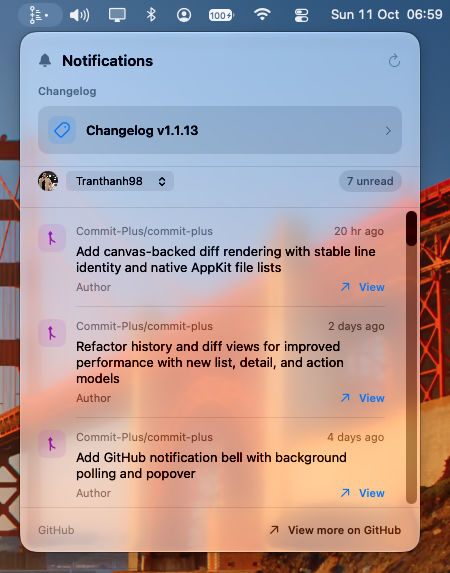
In this example, the selected account has seven unread notifications in its cached recent inbox. Each entry has a View action, and View more on GitHub opens the full inbox. The panel also provides a shortcut to the changelog for your installed CommitPlus version.
Watch the workflow
The demo below shows GitHub notifications in CommitPlus. There is also a notification bell in the repository toolbar, giving you another way to reach the inbox while reviewing your code.
Keep multiple accounts within reach
If you have separate work and personal GitHub accounts, use the account selector to focus on one inbox or choose All accounts to see their notifications together. You can follow the relevant repository updates without switching between browser sessions just to see what needs attention.
Get started
- Connect your GitHub account in CommitPlus. If no account is connected, the panel offers a Connect GitHub action.
- Open the notification panel from the menu bar or the repository toolbar bell.
- Select an account and scan its recent notifications. Use the refresh button to request the latest updates when available.
- Choose View to open a conversation, or View more on GitHub for the full inbox.
Notifications require a compatible GitHub API token; SSH credentials alone cannot fetch the inbox. If the panel reports an access problem, use Manage connections to check the account credentials.
The panel is a view of recent notifications, with unread counts based on the latest 50 fetched per account. Use GitHub's full inbox when you need to browse beyond that recent activity.
Download CommitPlus to keep your GitHub inbox close to your everyday Git work.
Thanh Tran
Passionate developer and creator of CommitPlus. Focused on building beautiful and performant macOS applications.